Helpful Stuff
The following guidelines and resources will help you create effective marketing materials that reflect the University at Buffalo brand and ensure compliance with established standards.
All PDFs and internal documents, spreadsheets, presentations, video clips, etc., must meet accessibility requirements. Converting PDFs and all internal media files into web content or digital forms is the best solution. If you must use a PDF, you can receive special SUNY pricing with GrackleDocs for PDF remediation.
All digital communications (websites, social media, email, etc.) must meet WCAG 2.1 AA accessibility guidelines. If you manage a website or social media channel, you are responsible for understanding and complying with these requirements.
Captioning is a critical and required component of audio and video accessibility. More information about accessibility and GrackleDocs is available on UB’s Electronic Accessibility website.
Helpful tools and resources
Remember that all UB communications must adhere to AP and UB Style requirements.
This includes emails, flyers, presentation decks, web content, etc. You can access the AP and UB Style Guides on the UB Style Guide webpage.
Helpful tools and resources
To work with a freelance graphic designer, you must go through one of the pre-qualified vendors. New vendors have recently been added to the list of pre-qualified designers.
You may contact any of the pre-qualified vendors to request estimates. Be sure to follow the general procurement guidelines to determine how many estimates are required based on your dollar threshold.
Helpful tools and resources
Designing a flyer, poster or email banner? We’ve pulled together branded templates and design assets to make it easy. These resources help you create eye-catching, on-brand materials without starting from scratch.
Design Templates

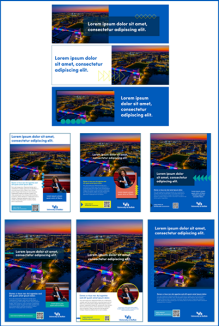
Use our ready-to-use templates to create your flyer, poster or email banner. Start with one of our branded templates—designed to make your job easier and your materials look great.
You’ll find three design options for each format:
- 8.5” x 11” flyers
- 11” x 17” posters
- Mailchimp email banners
All templates are provided as editable PowerPoint files. Prefer Canva? Just upload the PowerPoint file to your Canva account and start customizing—it’s that simple.
Design Elements


Browse and download ready-to-use design assets to help you produce polished, professional materials that align with the UB brand. Each design is available in UB’s official brand colors and comes in multiple file formats, including JPG, PNG and the original Adobe Illustrator files.
All media requests (internal UB publications or external) should route through the MCDE office. If you have an event or story that you would like considered for UBNow coverage, please get in touch with the MCDE team.
Important note: If you receive a request from a media outlet, always route it to Dawn Reed.
Streamline your presentation slideshow and keep it consistent with the UB brand guidelines by starting with one of our PowerPoint templates. Fully accessible unit templates include new headers, tab order, slide layouts and colors.
Sometimes known as promo gifts, giveaways or “swag,” promotional products are customized merchandise intended to publicize the university or a specific department, service, event or initiative.
Before placing an order for promotional items, please watch this quick training video, "Ordering Internal Branded Merchandise," to ensure you are following the university’s procedures.
Siteimprove is a tool that provides quality assurance and accessibility checks on every page and document on your website. Siteimprove identifies misspelled words, broken links, accessibility issues and much more.
All website managers and content owners should receive weekly Siteimprove reports and log in regularly to ensure their websites are in tip-top shape. If you are managing a website and do not have access to Siteimprove, please submit a work order through the MCDE Service Desk.
Helpful tools and resources
Only full-time professional staff are permitted to manage university social media accounts. Students and GAs can contribute content, but are not allowed to manage channels. If you have questions about this, please contact the Office of Marketing, Communications and Digital Engagement. To remain active, social media channels must meet all requirements outlined by University Communications and maintain a consistent, on-brand content strategy. New channel requests must be submitted to MCDE for approval.
Helpful tools and resources
All marketing, communications and digital materials must adhere to the UB Brand, including the use of approved fonts, colors, lockups and style elements. Materials promoting offices, programs, or services to students, faculty, staff or external audiences are required to adhere to these brand standards.
Anyone involved in creating such materials—whether staff, students or graduate assistants—must be familiar with the UB brand and is encouraged to attend UB brand training before starting any work.
Resources, including unit lockups, templates, the stationery system, trademarks and licensing information, and other brand guidelines, are available on the UB Brand & Identity website.
Note: All lockups must now include a registration mark. This is the only acceptable version. Please update any existing materials to ensure the correct lockup is used.
Helpful tools and resources
Do you have new staff who need access to update your website? The process for requesting and granting user access to the UB Content Management System (UBCMS) is as follows:
- Submit a work order request to MCDE.
- The new user must complete the DCT’s online Self-Paced Training course.
- Then the new user must complete the one-hour MCDE UBCMS Overview – Tips & Tricks Zoom session with Doug Kozar. This session provides more detail about the UBCMS and is offered every 5 weeks throughout the calendar year. Weekly sessions are added to the training schedule at the beginning of the fall and spring semesters.
- Immediately after the MCDE training session, the new user will be granted author privileges for your unit’s website(s).
- The website owner must approve the publisher privilege for your unit’s website(s). Doug Kozar will reach out to the website owner to confirm this privilege.
Please note: Graduate Assistants can only be granted author status. A full-time staff member must publish updated web content created by GAs.
Important items to keep in mind when assigning user access to update your website(s):
- Users should be familiar with the UBCMS website and participate in DCT meetings*.
- Content creation and updates must comply with UB Standards and AP Style Guidelines. Poor grammar and spelling errors are not acceptable.
- Digital content publications must be UB brand-compliant in all cases.
- UB’s accessibility standards must be met when publishing content and digital media. This includes ensuring color contrast, alt-text and header requirements are adhered to, and sites are mobile responsive. Further, any PDF document linked or referenced on your website must pass accessibility standards.
- Web links (including email addresses and phone numbers) must be formatted appropriately and tested to ensure targets do not generate broken links. For more information, the Office of Marketing, Communications and Digital Engagement (MCDE) offers a training class on creating web links properly.
- Users should review weekly Siteimprove reports and take corrective action as needed*.
* If users are not receiving these communications, please submit a work order requesting access.
Please only assign website stewardship to staff or graduate assistants who meet the above standards. Websites with errors and inaccessible content pose a risk to the university.
Helpful tools and resources
Directors are responsible for understanding the access their employees have to the MCDE work order system, UBCMS, Formstack, Google Analytics, Siteimprove, UB Box, social media accounts and other digital products. Informing the respective unit to update access when an employee leaves your unit is part of the exit checklist.
Please notify Doug Kozar in our office when an employee leaves so we may remove access and update our records. Submit a work order through the MCDE Service Desk to request user access for new staff members and GA's.
Every website in the UGE portfolio is tracked by Google Analytics. MCDE has implemented comprehensive and detailed tracking to assist website owners and content managers in reviewing, analyzing and reporting on visitor acquisition, visitor demographics and visitors’ site usage and behaviors.
This level of tracking helps you best understand your website’s performance among your visitor community. It is strongly encouraged that you review your web analytics regularly, especially before you embark on major content updates and reengineering your site’s information architecture (i.e., navigation menu tiers).
The MCDE team is available for training and consultation as and when needed. Submit a work order through the MCDE Service Desk for web analytics assistance.
Helpful tools and resources
You should use the UBCMS forms component for simple intake forms, or Formstack for sophisticated web-based forms. Google Forms and other third-party cloud-based forms solutions should not be used on UGE websites. Any UGE staff member who has a web form on their website and has been appointed and authorized to handle the web form output must know why they require the form data, what they plan to do with the form data and have completed UB’s “Handling Data Safely” course.
MCDE builds and maintains all Formstack forms for UGE. Submit a work order through the MCDE Service Desk for form support.
Helpful tools and resources
Have questions?
Call a member of the MCDE team to help guide you through the process or submit a work order.